
Comparison of Plate V1 and V2
Translated from Chinese by AI (deepseek-chat). It may differ from the original.
I recently started an internship at Plate, and my boss asked me to study thoroughly before working on features, which is why I wrote this article. Only by clarifying the comparison between the two versions can I understand what exactly I'm currently working on (personal understanding, there may be errors)
Slate and Plite
V1 and V2 don't refer to versions of the Plate package, but rather because the underlying editor engine was refactored, so I call them V1 and V2. However, I've only just joined, and I don't understand much of the underlying stuff yet, so please don't take the content too seriously
Slate is the Rich-text editor framework and editing engine that Plate v1 initially used, but Slate only handles very basic underlying things and doesn't directly implement a full rich-text editor. For the many more features of a rich-text editor, Plate chose to build them using a plugin system. Whatever feature you need, you use the corresponding plugin. A so-called plugin can be understood as the highly decoupled Model layer in the backend—whatever feature you need, you register it, that kind of feeling. So our editor can be extremely lightweight; just add whatever plugins you need. If you find that troublesome, you can use Plate's basic toolkit with one click, which we call a Kit.
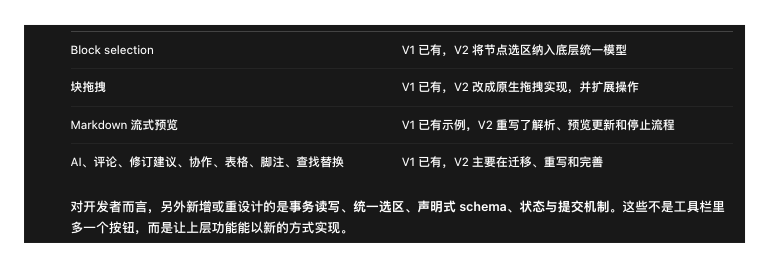
v1 is based on Slate, but the Slate core package doesn't include the commonly used Block Selection—only the most basic Text Selection. To use Block Selection in Plate, you need to add a plugin. Why switch from using Slate just fine to the self-developed Plite? Honestly, I don't know either. My guess is the direction might be related to performance (the Plite editing engine's performance shouldn't be worse than Slate), convenience (Plite organizes a single edit of the editor into a transaction, which may include multiple operations, similar to a database—after committing the transaction the edit is complete, and it also makes Undo operations convenient), and unification (bringing scattered APIs together, so this version will have major API changes, as well as a unified model, DOM selection, and browser input). There might also be some historical reasons (certain PRs). These are all my guesses and thoughts, though why don't I just ask my boss directly (🥲)
v2, the new version of Plate we're currently developing, has the team replacing the underlying core from Slate with the self-developed Plite. At the M layer, Plite has almost the same data structures and the same approach as Slate. Both use the Slate node tree, using Text to represent text nodes, with pages having a type to indicate the text type, plus attributes to control its style, Element having children underneath, a Path for the node's position in the tree, and Range representing a Text selection (anchor, focus, offset), etc. Thanks to Plite and Slate having so much in common and such a good data structure for description, it's very easy to understand. But Plite also has a big change: it moved the previous Selection part down to the editor engine layer, that is, into its core package, merging Text Selection and Block Selection together, with the underlying layer uniformly managingSelection = TextSelection | NodeSelection | null, so that we can enjoy the great Block Selection feature without plugins (the version of the Lexical editor I'm using to write this article doesn't support Block Selection yet; the new version does). Of course, the downside of doing this is that upper-layer features need to be re-adapted, but clearly this change is correct in the long term. Another change is the one mentioned in the parentheses in the guess section above.
Radix UI and Base UI
Last December, shadcn/ui supported using Base UI as the underlying primitive solution; this December, shadcn/ui officially made Base UI the default solution. In 2020, Radix UI was released and quickly spread, becoming one of the most widely used Headless component libraries. In 2023, shadcn/ui was released, built on Radix UI by default from the start. I searched online for the reasons behind Base UI's emergence and why shadcn/ui is willing to use Base UI by default. After Radix UI was acquired by WorkOS, its maintenance slowed down, while Base UI, developed full-time by the MUI team (including Radix UI's founder, Colm Tuite), shows stronger competitiveness in React 19 compatibility, bundle size, and support for complex components. I feel it's just that after Radix UI was acquired, updates became too slow and too unstable, and support for key React 19 features kept being delayed, making its prospects completely unpredictable (the frontend of the current Blog is still Innei's self-developed component library based on Radix UI back then, still on Next 14—sigh, time really flies)
Anyway, what does this have to do with our Plate? Actually, as early as May this year, someone in Plate's discussions asked about Base UI, and later in an August discussion the actual timeline was clarified
zbeyens replied, "It will be supported. Note that our components depend on shadcn components, so you could replace those with the base ones." He later added, "Probably for the end of the year."
So obviously, our new version is meant to add support for Base UI, and that's exactly what Plate v2 is doing. After letting Astra read the repository, we can see

So that's roughly the situation
New Features
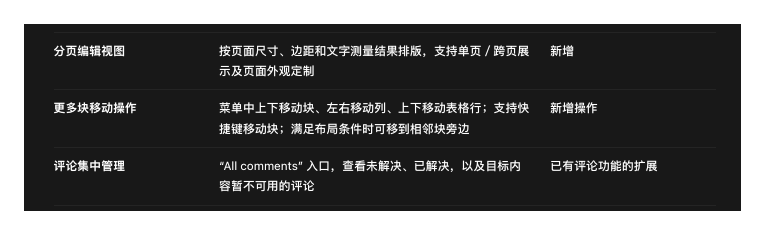
From what I can currently perceive, there might just be the paginated view feature and Details; the rest is mostly underlying and performance optimizations. The paginated view feature can be imagined as similar to Word—a sheet of paper with page margins and page spacing, where content is displayed across pages according to the layout. But here it's certainly configurable, in line with Plate's consistent plugin-based, configurable style.
Next is Details. Actually, back in V1 there was already a Toggle, but Toggle is simplicity itself—its functionality is very simple: it's just a collapsible component that can hold child paragraphs to display content. It doesn't support nesting a Toggle inside a Toggle. If you insist on doing so, you can only simulate it with table tabs; the nodes themselves are still a parallel structure, and you can't change the Summary's style either, so it can't reach Notion's level.
This time Toggle was refactored into the Details component, and many new features were added for it, truly supporting multi-level nested Details, because its underlying node tree structure supports nesting. However, it still doesn't support changing the Summary's type, nor directly changing Text into any Heading. Currently, if you change the Text that was originally a Summary into a Heading, then the Summary will directly become one of the child paragraphs, and then due to the Details plugin rules, a blank-content Summary will be automatically generated, making your Details look something like the following.
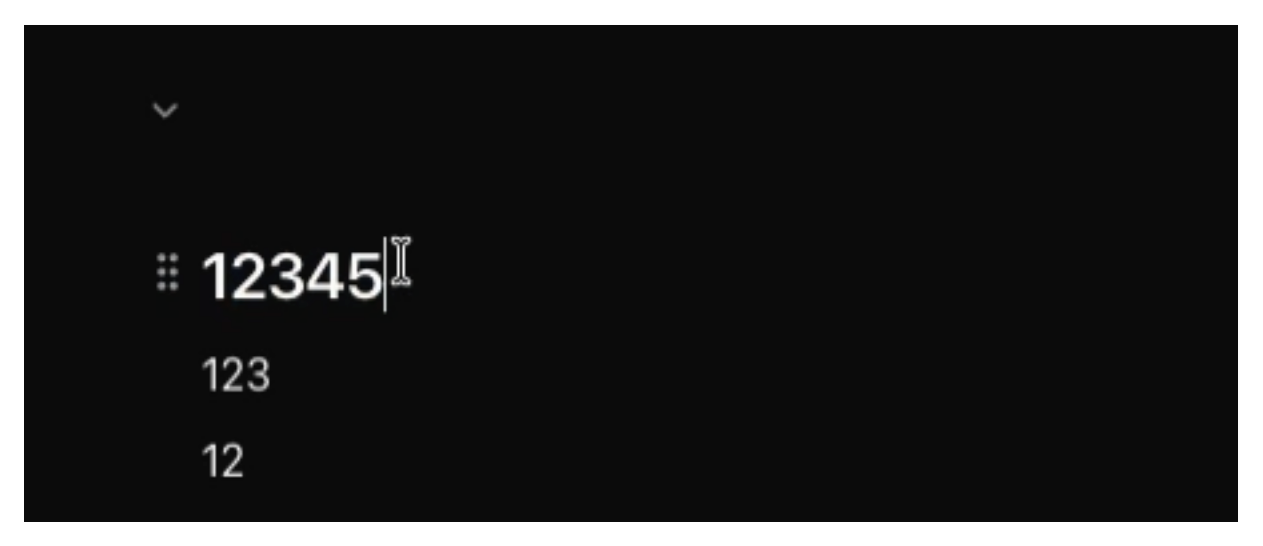
In this situation, it should be said that if changing a Summary into a Heading isn't supported, then this change-to-Heading feature should be disabled, or it should be possible to turn off this feature through configuration (not yet implemented). Or we should support this feature—at least Notion supports it, and I think we should support it too. But I haven't talked to my boss about it yet; perhaps he already has plans, who knows.
There are also some redesigns and rewrites of old features that I heard about from GPT, plus some features I haven't yet perceived
Honestly, I do have some fate with rich-text editors. In class I heard an old-timer from over 10 years ago say, "If you think you're very technical, go develop a rich text editor." Innei also explored rich-text editors on his own in university and modified Lexical. Reading his articles taught me about the other value of rich-text editors, and I've been exploring how to render better text formats in long lists myself. When OpenAI fully opened GPT6 Sol a few days ago, they launched their Intelligent UI to make replies in Chat mode even better.
I hope to learn more from Plate. I'm honored to participate in Plate's open-source development. As my first open-source project, I'll devote a lot of time and energy to it—not just because it's a company project, but more because of my love for open source.
Comments
No comments yet. Say something?