
The Past Month: A Night Sky, a Sea Otter, and a Rented GPU
Translated from Chinese by AI (deepseek-flash). It may differ from the original.
Let me sum up what I've been up to lately: the blog's new style Yozora, an app for managing subscriptions, and running GPU rentals.
Yozora
Yozora is the new look of this blog, and the name is the romanization of the Japanese word for "night sky." Because this semester I've basically been spending all my time in the lab, staying late—at least leaving at 10:30, and now it seems even later, 11 o'clock. By the time I head back at night it's already dark, and unfortunately there are no stars in the dark sky, which makes me feel awful, and probably lost too. Unbidden, the starry sky I saw during military training in my first year of high school at a rural school came to mind—so many stars, dazzling and brilliant. So I decided to change the blog to a starry-sky style—the starry sky in my heart, without my confusion, only poetry and distant places. That's also where the footer line "The starry sky overhead is the starry sky in my heart" comes from.
Previously the blog used Innei's Shiro. It looked great, but it was someone else's look. Shiro is the new blog style Innei made in '24, made after Innei came out of a low point—you could call it his fresh start. Five spring presets, a great design system, a product of the pre-AI era, though unfortunately the tech stack is a bit outdated. On October 22 I opened an empty Next.js project (originally I wasn't planning to use Next and wanted to look at other frameworks, but then I thought it would feel uncomfortable to switch frameworks without having used Next much, so I went with Next), planning to write a frontend from scratch while keeping Mix Space as the backend. Over a month I made over five hundred commits, and on November 16 I switched the main domain from Shiro to Yozora.
A few of my favorite parts:
- A night sky you can press down. The whole site's background is a night sky drawn with WebGL; the stars twinkle, the moon glows according to the real lunar phase, and every so often a shooting star streaks by. Press and hold the mouse on an empty area, and the starry sky sinks into a pit, with starlight bending into it; release and it springs back.
- Night Flight Island. The header morphs: spread out at the top it's the navigation, and while reading an article it shrinks into a small capsule showing the title and reading progress, and it even makes an announcement when there's a new post. This is actually learning from Innei's design—Innei specifically talked about the navigation header design in Shiro, saying at the time it was where he spent the most time. I think the navigation header can carry a lot of information, and it's the place on a site with the most interaction, so it needs to be designed well.


- Swarm mouse intro. You can see this animation when you refresh the homepage; the animationskill source.
- The star belt in the footer. In my first year I grinded LeetCode, and later I started writing code; each day's record is a star. The transition from solving problems to writing code is right there in that strip, but LeetCode's Chinese site treats my server's requests as a bot and blocks them, so I can only have my Mac fetch it once a day at noon, store it in the blog backend, and the site reads it from the backend..
- Now playing. The site name in the header occasionally scrolls into the app I currently have open and the song I'm playing, using Innei'sYohakuCompanion.
- URL delete-old-push-new animation. You can observe the in-site URLs—when navigating within the site there's an animation, using history.replaceState, which came out years ago; it can change the URL without navigating, though it's an API from years ago, and Innei played with it long ago.
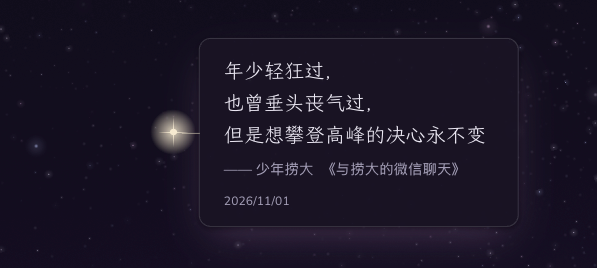
- Hitokoto. My definition of hitokoto here should be a casually spoken sentence—anything goes, as long as it has feeling, like the image below:
Technically, what I learned the most about was caching. The blog's content is in the backend, and the question was how the frontend can "see changes immediately after editing, without asking the backend every time." I revised it back and forth several times, and in the end it was Webhook notifying the frontend to invalidate the cache, plus Core's own layered Redis cache. Another habit: for every bug I fix, I first write a test that reproduces it, then make it pass after fixing. Among the five hundred-plus commits, test scripts account for quite a few.
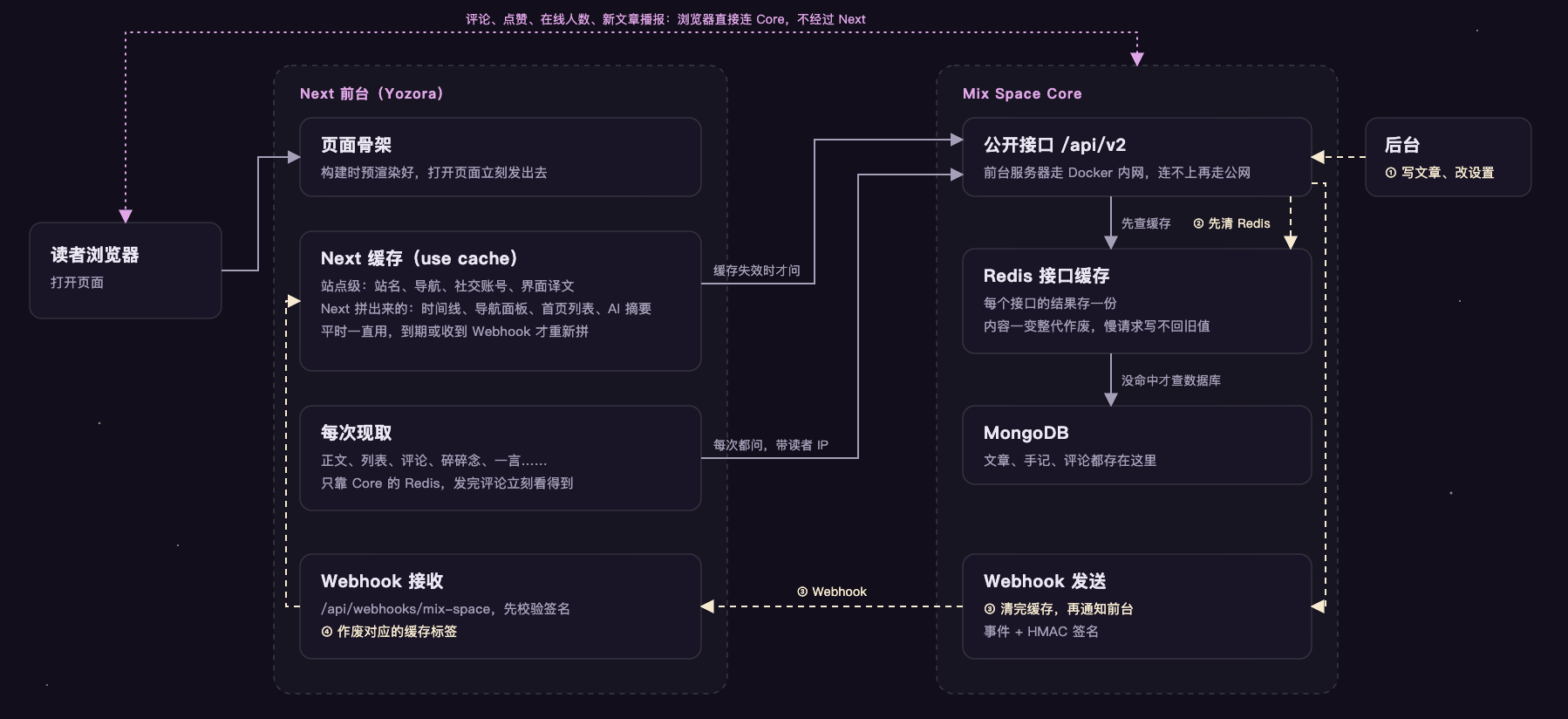
Actually I don't feel I've learned it very well—I just know you can't blindly use Next's cache, otherwise you can't get the reader's IP and only ever get the Next server's IP each time. Next's cache is best used only for things that mostly don't change and that everyone will definitely see, like the header and footer, page skeletons, and so on; other API caching still has to go through Redis. The frontend-backend structure still has to be like this: API caching relies on Redis, without too much caching, otherwise it's hard to manage. Next's server side just forwards requests, hiding the real Core address; some addresses connect directly to Core, carrying the IP. Also, when I publish a post in the backend, I need to clear the API cache, letting the WebHook notify the frontend to clear and update the cache.
Technically there's also trying out the relatively new headless UI library—BaseUI. I saw in Plate that the components had all changed, and shadcn/ui had also switched to BaseUI as the Primitives UI.I feel I'm still a novice; I don't have any obvious sense of the benefits of switching from Radix UI to Base UI. To me everything seems novel, and I still don't understand the meaning and history of these changes, but if the community uses it, then let's switch first.
As for CSS styling, I originally planned to use Tailwind, but now AI writes all the code, so in the end I let AI choose for itself—let it pick what it wants to use, and the result was native...
Yozora is built on the shoulders of others. For the frontend style I originally wanted to make a whole new set myself, but in the end I felt Shiro's layout was better, and the backend is Innei's Mix Space. Many interactions I learned by watching Shiro at first, and the footer says "Built on Innei's Mix Space." The code is open-sourced at sin6626/Yozora.
Ottie
Ottie is a tiny app for managing subscriptions, whose mascot is a sea otter, also named Ottie. Servers, AI tools—more and more things quietly charge money every month, and I wanted something to keep an eye on when they renew.
The sea otter's appearance is the reminder itself: when the charge is still far off, it floats on its back in the sea asleep; with a week left, it sits up holding a calendar and stares; on the day of the charge, it holds up a sign and slaps the water. The features are deliberately few, the data is stored only on the phone, with no account and no server. The UI and this sea otter are the product itself.
The project's tech stack is React Native, using the Expo framework—Expo's whole development chain, EAS builds, and later when I ran out of quota, building via GitHub Action. Originally I chose cross-platform because I didn't want to download Xcode to develop a native Apple app, but in the end, even though I used cross-platform, I still couldn't sign the app (no developer account), and others couldn't download it either—I don't even have the right to give Ottie an .ipa...
While making it I made heavy use of Innei's Ryugi, using it for Ottie's design, UI, animations, and so on. But actually Ryugi can do even more—it can basically handle all imaginative work, and it's quite useful when connected with AI. But having AI output too much at once isn't good either; I still feel segmented design suits me.
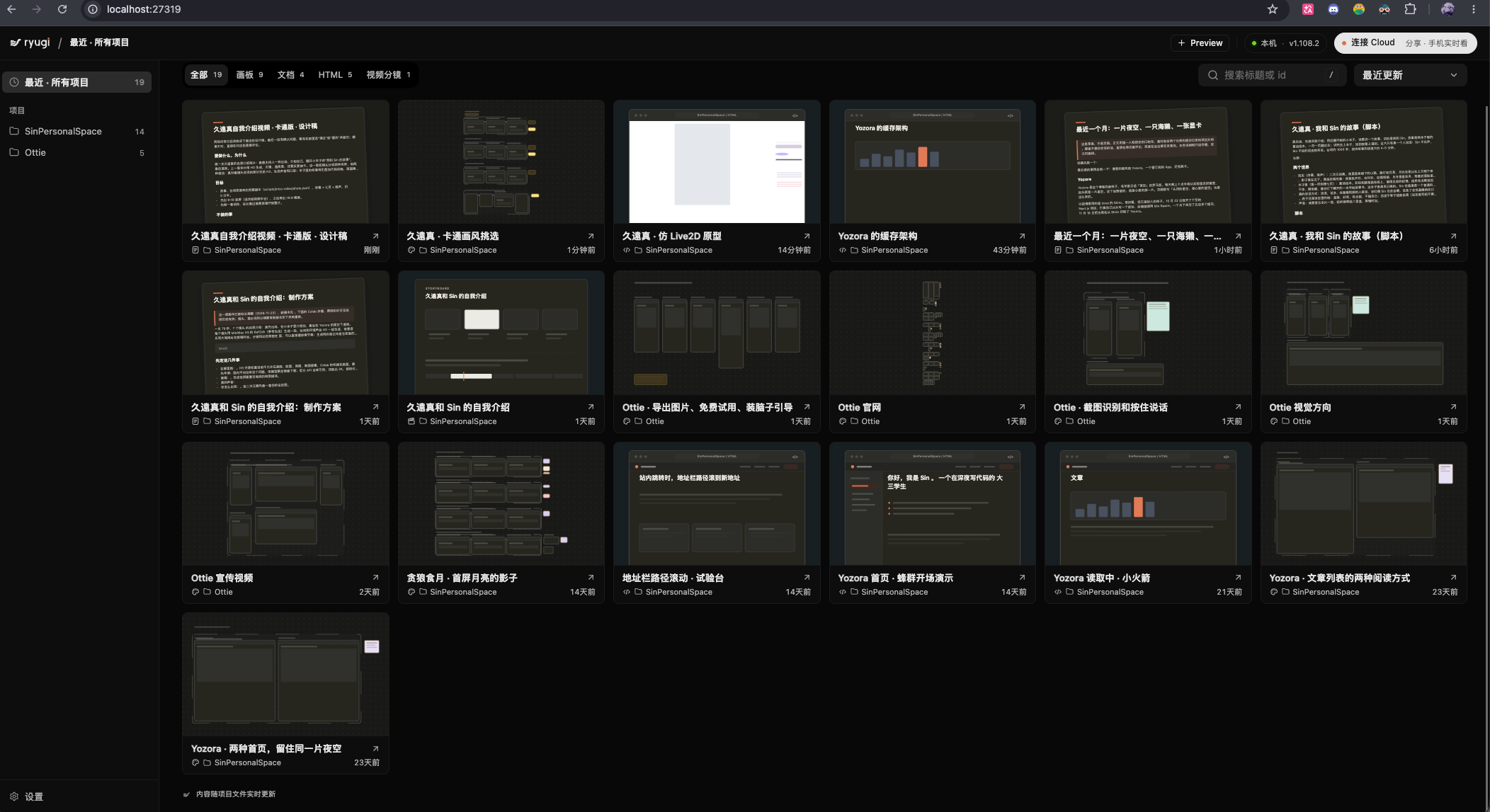
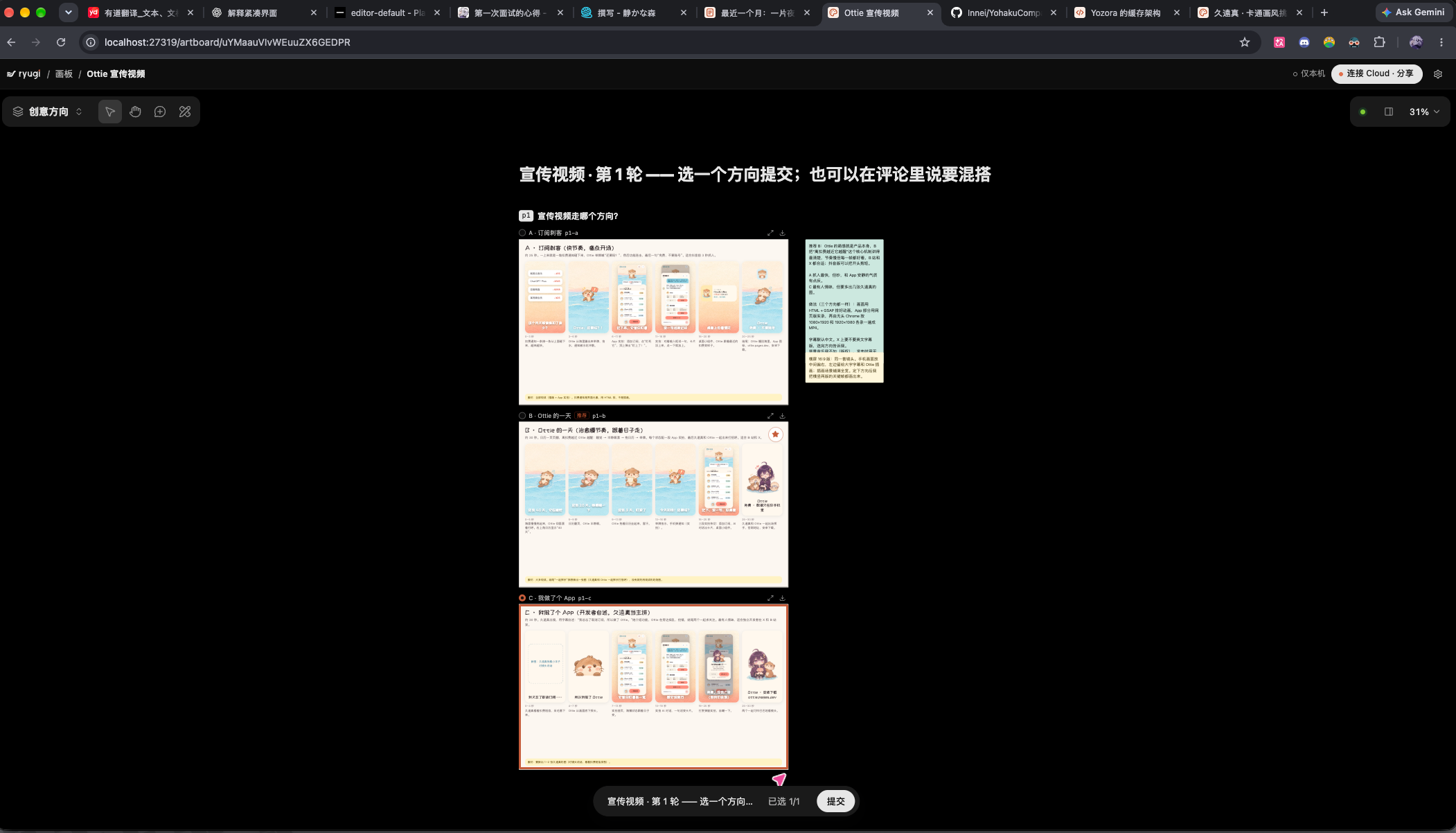
Things added to Ottie later:
- Talk to Ottie. This is an AI feature, but it feels more like an Agent feature, except I didn't add many tools. If you don't want to fill out a form, just say "I just got a video membership, 25 a month," or drop in a screenshot of an auto-renewal, and it will organize it into a card; one tap and it remembers it for you. The effect is the same as recording it manually—the difference is that before you might have had to know how to use the app, but now you just have to tell the AI. Speech recognition uses an on-device model on Android, done offline, without sending recordings out; the cost is a somewhat larger package size.
- Free trial reminder. It reminds you before the trial is about to end, and on the expiry day asks whether you want to keep it.
- Show a receipt. It prints all subscriptions as a small receipt, with the sea otter as cashier; you can save it to your album and share it, and it can also serve as a backup for Ottie to read back. The backup idea is actually quite natural—nowadays models are all multimodal with strong image recognition, fully able to understand what an image means for the app itself: there are subscriptions, there are charges, and it asks whether you want to record them. So compared to a traditional backup being a piece of data, I lean more toward it being an image (not because I can't find the backup data on my phone...).
- Desktop widgetsand a bilingual Chinese-English interface. How can an app be without widgets?
Work started on November 19; it's now at 1.1.0, and Android can be downloaded from the official site ottie.pages.dev.
Running GPU rentals
Lately I've been making a self-introduction video for 久遠真 (Kudō Makoto, the AIGC character on my blog's homepage). She's an image I drew for myself, usually hidden behind the homepage avatar. In the video she opens a little notebook and tells the story of her and me (probably going to be shelved—can't afford a full-power video generation model...).
The video is generated with MiniMax's H3; the model needs a big GPU, which I don't have, so I rent one on Colab. Because Google AI Pro (thanks to b深 for providing the account) gives 200 CU of Colab quota every month, I went to Colab to rent a GPU and run the video. With a Pro membership account I wanted an A100, but couldn't get through the queue, and in the end only got an L4 (22GB VRAM). Using an 8-bit quantized model plus 4-step acceleration, a 12-second 768p clip takes about 18 minutes to run, with VRAM and RAM nearly maxed out, but the result still isn't good—it's still a GPU problem.
A few pitfalls I hit:
- As soon as Colab goes idle, the runtime is reclaimed and all the files generated on the machine are gone. It's best to connect Google Drive and download to it after running; here I can only download locally, and Google Drive isn't connected.
- Even during the day I can't grab an A100; I've waited over ten minutes even for an L4, and I hear even Ultra can't get an A100.
- The first segment was generated in four versions, and I picked the third version's voice as her voice; for each later segment I use this voice as a reference, which ensures it's the same person speaking.
Also, I recommend ego-lite—it's really so useful. When I couldn't use Colab CLI, I relied entirely on Claude using the ego-lite browser to operate Colab for me on the page. It's really useful: one-click import of Chrome's Profile, and when the Agent runs it doesn't steal your mouse or your screen. My Ottie deployment on CloudFlare Pages and the R2 storage were all done by Claude operating ego-lite—so smooth.
But this crippled H3 is too hard to use—it generates characters with three hands, and it feels very unnatural. Later I plan to change approach: use H3 to generate video at the beginning and end, use Remotion + FFmpeg in the middle with Claude writing it directly, and have GPT generate the images.
Closing words
In one month: a night sky, a sea otter, a rented GPU, and slow work, I guess. Hang in there with the Plate refactor—I really am switching rich text editors. Oh right, I changed to a new lab; the environment is pretty good, though eating is very inconvenient, but overall it's better, I suppose. I'm still very lost. I use AI way too much now, and I don't know what I could do without it. At work I also use AI a lot of the time, and in my own projects I use AI heavily too. I feel my attention getting more and more scattered, and the daily information volume from talking with AI is huge, yet I can't absorb it well. Whatever—I'll keep writing articles. Write it down, let it settle, and don't let myself feel so empty.
Comments
No comments yet. Say something?